
Get 4–8 Google Reviews Per Month for Contractors, Policy Compliant
The fastest, safest way to get more Google reviews is to ask every satisfied customer within 24 to 48 hours using a one tap review link or QR code, then reply to what comes back. BrightLocal found 71% of consumers already use Google to check reviews before hiring, so speed and consistency beat clever tricks. Google itself bans paying for reviews or gating them by star rating, and profiles that get flagged can lose reviews overnight or get suspended entirely. Steady, policy-safe requests, not volume hacks, are what actually move the needle.
TL;DR:
- Consistently ask every satisfied customer for a review within 24 to 48 hours using a direct link or QR code, as timing greatly improves response rates.
- Avoid offering incentives or filtering customers based on satisfaction levels, since Google bans review gating and biased solicitation, which can risk profile suspension.
- Respond to at least 75% of reviews within 24 to 48 hours to boost local search rankings, with short, specific replies that acknowledge the customer’s experience.
- Automate review requests by triggering them upon job completion and personalizing messages, but monitor for unnatural review spikes that may indicate manipulation.
- Focus on increasing review velocity (reviews per month) and recency rather than total review count, with 4 to 8 new reviews monthly as a practical target for small businesses.
Table of Contents
- Quick wins: four things to set up today
- How do you ask without breaking Google’s rules?
- Responding to reviews: what actually moves rankings
- Automating requests without sounding like a robot
- What should you actually measure?
- What gets profiles flagged, and how do you recover?
- Legal and ethical considerations beyond Google’s policy
- Making reviews part of how you run the business, not an afterthought
- Why steady, automated review growth beats chasing volume
- How OnLead helps contractors turn every job into a review opportunity
- Sources
- FAQ
Quick wins: four things to set up today
You don’t need new software to start collecting more reviews this afternoon. You need a link, a script, and a habit.
Build your review link and QR code first. Google’s own Business Profile help centre walks you through generating a direct “write a review” link from your dashboard. Paste that link into a free QR code generator and you’ve got a scannable code for invoices, yard signs, or the passenger seat of your service van.
Where to put it matters as much as having it:
- On paper and digital invoices, right next to the total due
- In your email signature, so every reply becomes a soft ask
- In appointment confirmation and completion texts
- On a small printed card handed over at job completion
For staff scripts, keep it conversational: “Glad we could sort that out for you today. If you’ve got 30 seconds, a Google review really helps other homeowners find us. I’ll text you the link right now.” A short SMS template works just as well: “Thanks for choosing us today. Mind leaving a quick review? [link]”
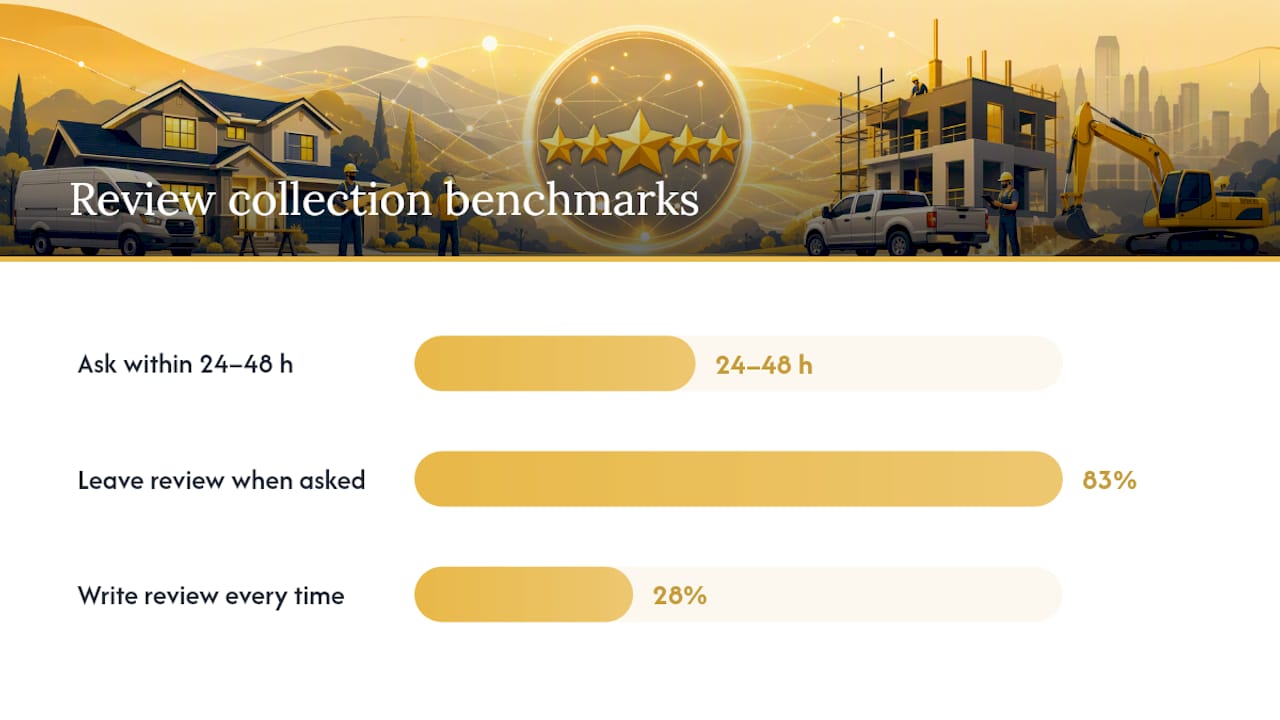
Timing beats everything else here. Ask within 24 to 48 hours of the job finishing, while the fix is still fresh. BrightLocal’s consumer survey found 83% of people asked for a review actually left one, and 28% say they’ll write one every single time they’re asked. The problem for most contractors isn’t reluctant customers. It’s simply forgetting to ask.
How do you ask without breaking Google’s rules?
Google explicitly prohibits offering incentives, like discounts, free services, or cash, in exchange for reviews. It also bans review gating, meaning you can’t filter customers by satisfaction level and only push the happy ones toward Google while quietly routing complaints elsewhere. A related policy on incentivized or biased reviews covers the same ground: selectively soliciting only positive feedback is treated the same as paying for it.
The compliant version looks like this:
- Ask every customer, not just the ones who seemed thrilled
- If you run a satisfaction survey, send the review request afterward regardless of the score
- Never offer a discount, entry into a draw, or free add-on tied to leaving a review
- Frame the ask around helping other homeowners decide, not around what’s in it for the customer
Pro Tip: If a customer complains before you’ve asked for a review, fix the issue first and skip the ask for that job. That’s not gating, that’s just good judgment. Gating only becomes a violation when you build a system that filters people by score before deciding who gets asked.
Selective asking backfires anyway. It skews your rating artificially high, and a sudden pattern of only-positive reviews is exactly what triggers Google’s spam filters.
Responding to reviews: what actually moves rankings
Google’s 2026 best practices playbook states that businesses replying to 75% or more of their reviews rank higher on average in local search, and recommends a 24 to 48 hour response window. Replies signal an active, managed profile, which is one of the factors search algorithms reward.
Keep templates short and specific rather than generic:
- Positive review: “Thanks, [name]! Glad the [specific service] worked out. We’ll see you for the next tune-up.”
- Negative review: “Sorry this didn’t go the way it should have, [name]. We’d like to make it right. Can you call [phone/email] so we can sort out the details?”
Pro Tip: Never argue the facts in a public reply. Acknowledge the concern, move the conversation offline, and let your calm tone do the persuading for anyone else reading it later.
If a negative review gets resolved, ask the customer to consider updating it. Most won’t, but the ones who do turn a liability into proof you handle problems well.
Automating requests without sounding like a robot
Manual asks work, but they don’t scale past a handful of jobs a week. Automation fixes that, as long as you keep it tied to real service events.
- Trigger on the invoice or job completion, not on a generic weekly blast. A request tied to a specific finished job converts better than a mass email, according to BrightLocal’s research, because the customer remembers exactly what you did.
- Use a short NPS-style question first for larger jobs (roof replacements, full system installs), then route everyone into the review request regardless of the score they give.
- Personalize the message with the technician’s name and the service performed. “Mike wanted to check in after your furnace install” beats “How did we do?” every time.
- Watch your dashboard for unnatural spikes. A sudden jump from two reviews a month to twenty looks like manipulation to Google’s spam systems, even when every review is genuine.
Keep the tone human. Automated doesn’t have to mean impersonal.
What should you actually measure?
Total review count matters less than most owners think. Velocity (how many reviews you earn per month) and recency (how fresh your latest reviews are) carry more weight in local ranking than a large, stale backlog, according to industry analysis of 2026 ranking signals.
Realistic monthly targets: most small trades businesses should aim for 4 to 8 new reviews per month. Milestones worth tracking along the way sit around 20, 50, and 150 total reviews, each of which tends to unlock more buyer confidence and more visibility in the local pack.
Track three numbers monthly: new reviews earned, average rating, and response rate. Report on them the same way you’d report revenue, because for a service business, they’re connected.
What gets profiles flagged, and how do you recover?
Google’s enforcement targets a specific set of behaviours, and it’s worth knowing them before you accidentally trip one:
- Buying reviews from third-party sellers or review farms
- Sudden, unnatural spikes in review volume
- Review gating or incentivized reviews, as outlined in policy
- Employees or family members posting reviews for the business they work at
If reviews disappear or your profile gets suppressed, don’t panic and don’t retaliate. Document your request campaign, including who you asked and when, then file an appeal through Google Business Profile support with that timeline attached. Clean records make the appeal faster.
Legal and ethical considerations beyond Google’s policy
Google’s rules are the floor, not the ceiling. In Canada, consumer protection law in most provinces treats a fabricated or paid review as deceptive marketing, separate from whatever Google’s terms of service say. The Competition Bureau has taken action against businesses for misleading endorsements, and that exposure exists whether or not Google ever notices the fake reviews.
There’s also a quieter ethical line worth respecting: asking an employee’s family members to post glowing reviews might not trip an automated spam filter immediately, but it’s still deceptive to the homeowner reading it. The same goes for reviews written by staff about their own employer without disclosing the relationship. Consumers are trusting that a five-star review came from an actual customer, and that trust is the entire reason review sites matter for lead generation in the first place.
Privacy is the other piece owners overlook. If you’re automating review requests by text or email, you need the customer’s consent to contact them that way under Canada’s anti-spam legislation (CASL). A review request sent to someone who never gave you permission to text them isn’t just risky. It can trigger a formal complaint entirely separate from anything Google does.
The practical takeaway: build a review program you’d be comfortable explaining line by line to a customer, a regulator, or a competitor. If any part of it depends on nobody looking too closely, it’s not a review strategy. It’s a liability waiting for a complaint.
Making reviews part of how you run the business, not an afterthought
The businesses that build steady review flow don’t treat it as a marketing task bolted onto the end of a job. They build it into the job itself. The technician who does a walkthrough, explains what was fixed, and hands over a card with a QR code is doing customer service and review generation in the same five minutes.

That integration matters because review requests sent by a stranger in a back office feel transactional. Requests sent by the person who was just in someone’s basement fixing their furnace feel like a natural extension of the service. The conversion difference between those two approaches is significant, even without hard numbers to cite, because it mirrors what BrightLocal found about asks tied to a real, remembered service event outperforming generic blasts.
Practically, that means training every technician and office staff member on the same 30-second script, not just handing the task to whoever manages your Google Business Profile. It means your invoicing software, your CRM, and your review request tool need to talk to each other so a completed job automatically triggers a request instead of relying on someone remembering to send it manually. And it means your GBP itself needs to be in good shape before you drive traffic to it. That’s an optimized, complete profile with accurate categories, service areas, and photos, not just a name and a phone number.
Review collection works best when it’s nobody’s separate job and everybody’s habit.
Why steady, automated review growth beats chasing volume
Most contractors we talk to have tried the review push once. A slow week, a mass text to old customers, a burst of five reviews, then silence for two months. That pattern looks fine on paper but reads as manipulation to anyone paying attention, including Google’s spam detection.
Process beats push. A contractor who builds a review request into every job completion, without exception, ends up with steadier velocity and a stronger response rate than one who occasionally remembers to ask. That consistency is also what shows up in local search visibility over time, since freshness and pace carry real weight in how Google ranks local businesses. For trades specifically, where jobs are seasonal and customer contact is brief, building the ask into the workflow matters more than any single clever script.
— OnLead
How OnLead helps contractors turn every job into a review opportunity
A marketing agency can offer an integrated solution that handles Google Business Profile optimization, policy-safe automated review flows, and local SEO together, rather than working with separate vendors for reputation management, SEO, and ads. That matters because reviews don’t work in isolation. A perfectly optimized profile with five reviews still loses to a mediocre one with fifty, and a great review count with no local search visibility never gets seen by homeowners searching in the first place.
Onlead sets up automated, job-triggered review requests that stay inside Google’s rules, then pairs that with Google Business Profile and local SEO work so those reviews actually show up when someone searches for an HVAC, plumbing, electrical, or roofing contractor nearby. Most campaigns launch within 72 hours, and you work directly with the founder rather than a rotating account team. Start with a free audit of your current profile and review setup through Onlead’s services page.
Sources
- Prohibited & restricted content - Maps user generated content policy help
- Google GBP best practices playbook 2026
- 35+ local SEO statistics you need for 2026 - BrightLocal
- Google reviews as ranking signals: what counts in 2026 - TheStacc
FAQ
How do you get 1,000 Google reviews?
There’s no shortcut to that scale. It comes from consistent monthly velocity, 4 to 8 reviews per month for most small businesses, sustained for years, combined with a request built into every single job or transaction rather than occasional campaigns.
What is the 20% rule in Google reviews?
There’s no official Google policy called the “20% rule.” It’s an informal benchmark some marketers use, suggesting roughly 20% of customers asked will leave a review, though BrightLocal’s data shows the real conversion rate is often much higher, around 83%, when the ask happens promptly and directly.
Can you pay for good Google reviews?
No. Google’s policy explicitly bans paying for reviews or offering any incentive, discount, or free service in exchange for one, and violations can lead to review removal or profile suspension.
How can you get more five star Google reviews?
You can’t ethically target only five-star reviews, since selectively asking happy customers is a form of review gating Google prohibits. The compliant approach is delivering consistently good service, asking every customer within 24 to 48 hours of the job, and letting the rating reflect the real experience.