
LSA First Contractor PPC Strategy That Books Jobs at 30 Conversions
Prioritize Local Services Ads where your trade qualifies, then fix your call and booked-job tracking before you touch a single bid. That order matters more than budget size. Once tracking is clean, layer in Search for intent control and add Performance Max only after you’re generating real conversion volume. If you’re logging fewer than 30 conversions a month, skip automated bidding entirely and manage bids by hand until the data catches up.
TL;DR:
- Prioritize local services ads first, as they typically have the lowest cost per booked job and are driven by review count, responsiveness, and bid, not spend.
- Set up precise conversion tracking, including offline imports, before using automated bidding or Performance Max campaigns to ensure the algorithm optimizes for revenue rather than inquiries.
- Structure campaigns by service line rather than convenience, with separate campaigns for emergency, install, and maintenance leads, allocating budget based on margin and close rate.
- Use niche, high-intent keywords like emergency and near-me phrases, and apply a strong negative keyword list to filter out DIY, job-seeker, and price research terms.
- Budget appropriately based on business size, with solo operators starting at $1,000 to $1,500 monthly, and larger firms requiring $2,500 or more for effective channel coverage.
Table of Contents
- What is a contractor PPC strategy?
- How does Google Local Services Ads work for contractors?
- Building an account structure that matches how your business actually runs
- Why does conversion tracking make or break a construction PPC campaign?
- When should you use Smart Bidding and Performance Max?
- Which keywords and negatives actually move the needle?
- Ad copy and extensions that turn searches into calls
- What does a high-converting contractor landing page need?
- How much should contractors budget for PPC by business size?
- What KPIs actually tell you if your contractor PPC is working?
- The 10-point contractor PPC audit to run this week
- OnLead’s take: what actually slows contractors down
- How OnLead builds this playbook for contractor clients
- Sources
- FAQ
What is a contractor PPC strategy?
A contractor PPC strategy is the plan that decides which Google channels get your ad dollars, in what order, and how you measure success against booked jobs rather than clicks. Most contractors get this backwards. They dump money into a broad Search campaign, turn on automated bidding within a week, and wonder why cost per lead is all over the map.
The better sequence starts with eligibility, not spend. Local Services Ads (LSA), standard Search, and Performance Max (PMax) each serve a different job in the funnel, and each one has a data threshold it needs before it performs well. Search advertising remains one of the largest and fastest growing global ad channels, which is exactly why the competition for contractor keywords has gotten expensive enough that sequencing and tracking discipline now separate profitable accounts from money pits.
The standard industry term for this discipline is “PPC account architecture,” and it covers three layers: channel selection, conversion measurement, and bid strategy. Get those three right, in that order, and everything else in this guide becomes optimization rather than damage control.
How does Google Local Services Ads work for contractors?
Local Services Ads often produce the lowest cost per booked job of any Google channel available to contractors, because you pay per lead instead of per click, and Google pre-screens the searcher’s intent before connecting you. LSA leads typically run between $25 and $95 depending on trade, with emergency plumbing and HVAC repair sitting at the higher end and general handyman work sitting lower.
Not every trade qualifies, and the ones that do need to clear a background check, licence verification, and insurance confirmation before ads go live. HVAC, plumbing, electrical, roofing, and general contracting are typically eligible in most Canadian markets, though availability shifts by city.
Three signals drive your LSA ranking, and none of them is spend:
- Review count and recency — a steady drip of fresh reviews beats a pile of old ones sitting untouched for a year.
- Responsiveness — contractors who answer calls within 60 seconds rank higher and convert more of the leads they do get.
- Bid — the least important lever of the three, useful only for tie-breaking once reviews and responsiveness are solid.
Statistic to know: LSA often runs at roughly half the cost per booked job of a blended Google Ads Search campaign, according to contractor advertising benchmarks, which is why it belongs first in the channel stack, not last.
If Google disputes a lead as invalid, contractors can request a credit, and building a weekly dispute cadence recovers real money most owners leave on the table. Pair that with a rising weekly spend cap as your answer rate improves, and LSA becomes the highest-ROI dollar in the account before you’ve even opened Google Ads Editor.
Building an account structure that matches how your business actually runs
Split your campaigns by service line, not by convenience. A roofing company running one campaign for “roof repair,” “roof replacement,” and “roof inspection” is mixing three different buyer intents, three different job values, and three different urgency levels into a bidding algorithm that can’t tell them apart.
Separate campaigns solve that. A repair searcher wants same-day service and clicks fast. An install searcher is comparison shopping over days or weeks. A maintenance searcher wants a recurring contract at the lowest possible price. Blend those into one budget and the algorithm optimizes toward whichever behaviour is most common, usually starving the higher-value install leads of spend.
The layered stack that works in practice:
- LSA first — covers your emergency and near-me demand with the lowest cost per booked job.
- Search second — gives you keyword-level control that LSA doesn’t offer, useful for install and remodel searches with longer research cycles.
- PMax third — added only once you have enough conversion history to feed the algorithm, since PMax without clean data and volume can become the most expensive campaign type in the account.
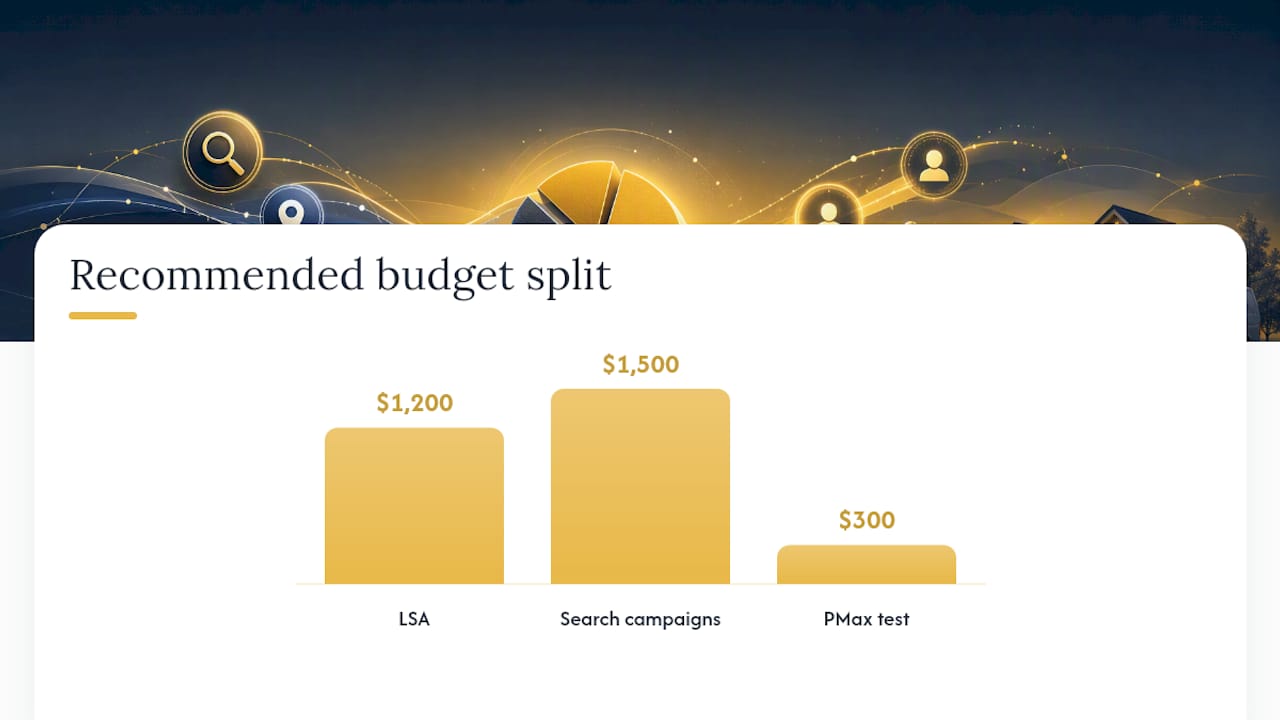
Budget segregation follows the same logic. A $3,000 monthly account might run $1,200 through LSA, $1,500 through Search split across two or three service-line campaigns, and $300 testing PMax once volume supports it. Set ad schedules to match crew availability, not to run 24/7 by default, and use geo-radius targeting tied to actual drive time rather than a flat postal code list.
Allocate the split by margin and close rate first, crew capacity second. A service line with a 60% close rate and strong margins deserves more budget than one converting at 20%, even if the second one generates cheaper clicks. Cheap clicks that don’t close are the most expensive leads you’ll ever buy.
Why does conversion tracking make or break a construction PPC campaign?
Clean conversion tracking changes what your bidding algorithm learns, and a construction PPC campaign running on broken or partial tracking is optimizing toward the wrong outcome no matter how good the ads look. Fix tracking before touching bids, budgets, or ad copy.
Here’s the sequence that actually gets tracking right:
- Install dynamic call tracking with a unique number swapped in per paid traffic source, so every call gets attributed to the exact campaign and keyword that generated it.
- Set a call conversion threshold of 60 seconds so accidental dials, wrong numbers, and immediate hang-ups don’t get counted as real leads.
- Fire form conversions on the thank-you page through Google Tag Manager rather than on the button click itself. A button click fires the moment someone taps submit, even if the form fails to send.
- Import booked-job data from your field service software as offline conversions, tagged with the actual job value where possible.
- Review the offline import weekly for the first month to confirm the data is matching correctly before trusting the algorithm to bid against it.
That fourth step matters more than most contractors realize. A raw form submission or a phone call isn’t a sale. It’s an inquiry. When you import which leads actually turned into a booked job, and ideally what that job was worth, Google’s bidding algorithm stops optimizing for form fills and starts optimizing for revenue. Well-implemented offline conversion imports have shown average CPL reductions of roughly $38 in contractor accounts, because the system finally learns which clicks turned into paid invoices instead of which clicks merely filled out a form.
Pro Tip: Run your call tracking numbers for two full weeks before making any bidding changes. Early data is noisy, and adjusting bids off a handful of calls is how good campaigns get wrecked by a bad Tuesday.
When should you use Smart Bidding and Performance Max?
Use Smart Bidding only once you have the conversion volume to support it, and the threshold is not a guess. Under 15 conversions a month, run manual bidding or Maximize Clicks. Between 15 and 30 conversions, Maximize Conversions works reasonably well. Past 30 conversions a month, you can move to Target CPA with confidence. Once monthly conversions are significantly higher and value data is fed through offline imports, Target ROAS becomes viable.
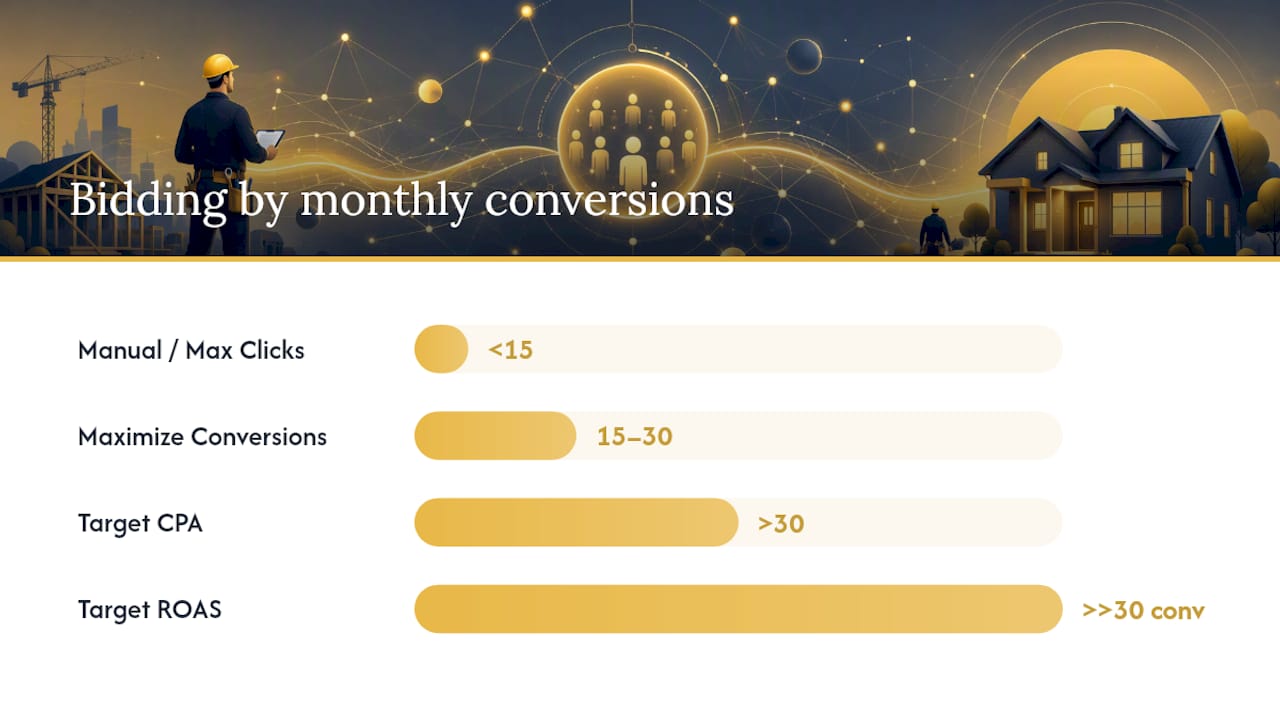
The number that changes everything: 30 conversions per month is the line where Target CPA bidding stops being a coin flip and starts being reliable, according to contractor PPC benchmarking data. Below that line, the algorithm simply doesn’t have enough signal to learn a stable pattern, and CPL swings wildly week to week.
Performance Max has its own prerequisites, and skipping them is the single fastest way to burn a monthly budget with nothing to show for it:
- Conversion tracking must be clean, including offline imports, before PMax gets a dollar.
- Budget at least $2,000 per PMax campaign, since underfunded campaigns rarely clear the algorithm’s learning phase.
- Segment asset groups by service line, mirroring your Search campaign structure rather than dumping every service into one generic asset group.
- Build a negative keyword list even though PMax doesn’t use traditional keywords, since audience signals and asset themes still need boundaries.
Set your initial Target CPA at 10 to 20 percent above your historical cost per acquisition, not at your target number. A Target CPA set too aggressively out of the gate starves the campaign of the volume it needs to learn, creating exactly the CPL volatility you were trying to avoid. Give any new bid strategy a 14-day undisturbed learning window; touching it daily resets the learning phase and keeps costs unstable indefinitely.
If PMax underperforms after that window, the fix is rarely “turn it off.” Add negatives, tighten asset-group segmentation, or pause the campaign until conversion data improves rather than abandoning the channel outright.
Which keywords and negatives actually move the needle?
Emergency and near-me phrases convert at the highest rate for contractors, because someone typing “emergency water heater repair near me” is minutes from booking, not weeks from researching. Prioritize repair, emergency, and “hire a [trade]” phrases over broad research terms like “how to fix a leaking faucet,” which pull in DIY searchers who never intended to hire anyone.
Broad match can work, but only when paired with a negative list strong enough to catch what broad match will inevitably pull in. Running broad match without negatives is how contractors end up paying for clicks from people looking for jobs, not job estimates.
A shared negative keyword list across every campaign should block:
- Job-seeker terms: “jobs,” “hiring,” “careers,” “apprentice,” “salary.”
- DIY terms: “how to,” “diy,” “tutorial,” “step by step.”
- Price-shopping research terms with no local or urgency signal: “average cost of,” “how much does.”
- Competitor and unrelated brand names that occasionally trigger broad match.
Review search terms daily for the first month of any new campaign, then settle into a weekly cadence once the account stabilizes. A ten-minute Monday morning check of last week’s search terms report catches wasted spend before it compounds into a wasted month.
Ad copy and extensions that turn searches into calls
Call-only ads work best for high-urgency, high-intent searches like emergency repairs, where the searcher wants a phone conversation immediately, not a landing page to scroll through. Standard search ads with call extensions work better for remodel, install, and financing searches, where the person may want to review your site before calling.
Copy that performs for emergency repair leans on immediacy: “24/7 Emergency Plumber – Same-Day Service, Call Now.” Copy for remodel financing works better when it removes the cost objection up front: “Kitchen Remodel Financing Available – Free In-Home Estimate.” Free-estimate offers consistently outperform vague value propositions because they answer the searcher’s next question before they have to ask it.
Extensions are not optional add-ons; they’re conversion tools:
- Sitelinks pointing to specific service pages (repair, install, financing) instead of just the homepage.
- Callouts highlighting licensing, warranty length, or same-day availability.
- Structured snippets listing the specific services you offer, which helps qualify clicks before they cost you money.
- Price extensions for services with predictable starting costs, since mobile searchers click ads frequently and price transparency reduces bounce from unqualified clicks.
Test one new headline or description every two weeks rather than rewriting the whole ad group at once. That pace gives Google’s ad rotation enough data to tell you which line actually moved the needle.
What does a high-converting contractor landing page need?
Phone-first layout wins for contractor landing pages, meaning your phone number sits above the fold, in a thumb-reachable spot on mobile, not buried in a footer. Add trust signals immediately below it: review counts, the Google Guarantee badge if you’re LSA-verified, licence numbers, and two or three project photos specific to the service being advertised.
The build sequence that consistently improves conversion rate:
- Lead with the phone number and a one-line value statement, not a paragraph of company history.
- Show trust signals (reviews, guarantee badges, licensing) within the first screen.
- Keep the form to four fields maximum: name, phone, service needed, and postal code.
- Add a micro-conversion option, like a “text us” button, for mobile visitors who won’t call but will text.
- Match the page’s service and photos exactly to the ad that sent the click.
Pro Tip: Run a simple A/B test between a long form and a four-field form before assuming more fields mean better-qualified leads. In most contractor accounts, shorter forms convert enough better to offset the small increase in unqualified submissions.
Clean, service-matched landing pages don’t just convert better on their own. They feed cleaner signal back into PMax and Smart Bidding, since a page that matches search intent generates the on-page behaviour Google’s algorithms use to judge quality.
For a deeper procedural walkthrough of setup, from account structure to tracking, see this step-by-step Google Ads setup guide built specifically for contractors.
How much should contractors budget for PPC by business size?
Solo operators typically start with $1,000 to $1,500 a month, weighted heavily toward LSA since it needs less volume to perform and carries lower risk of overspend on a thin budget. Mid-size shops running two or three crews generally need $2,500 to $5,000 to properly fund LSA, Search, and eventually PMax without starving any one channel. Larger firms with dedicated office staff for lead follow-up can often justify $6,000 or more, spread across service lines with room for genuine testing budget.
Decide the LSA-to-Search split by lead volume, not preference. If LSA alone is filling your calendar, there’s no urgency to expand Search spend. If crews have open slots, layer in Search before touching PMax, since PMax needs the conversion volume Search and LSA generate to function properly.
Bid adjustments matter more than most owners assume. Mobile devices generally deserve a positive adjustment for emergency services, since most consumers click mobile ads weekly and same-day repair searches skew heavily mobile. Time-of-day adjustments should favour business hours when someone’s actually answering the phone, and geography should flex toward the postal codes generating your best close rates, not just your highest click volume.
- Storm-driven services (roofing, restoration) need a seasonal playbook that can scale spend within hours of a weather event, not weeks.
- Remodel and install services follow a slower seasonal curve, typically ramping through spring and holding through fall.
- Maintenance contracts benefit from steady, unglamorous year-round spend rather than seasonal spikes.
What KPIs actually tell you if your contractor PPC is working?
Cost per booked job is the metric that matters, calculated as total ad spend divided by the number of leads that became paid jobs, not the number of leads generated. A campaign with cheap leads and a low close rate can cost more per booked job than a campaign with expensive leads that close at twice the rate.
Track weekly at the surface level (spend, leads, cost per lead), monthly at the depth level (cost per booked job, close rate by service line, impression share), and quarterly at the strategic level (channel mix, seasonal adjustment needs, whether PMax has earned a bigger share of budget).
Benchmark to watch: Accounts with clean offline conversion imports commonly see meaningfully lower cost per lead than accounts optimizing on raw form fills or calls alone, because the algorithm is finally bidding toward revenue instead of activity.
Red flags that demand same-day action:
- A sudden CPL spike with no budget or bid change, which usually means tracking broke somewhere in the chain.
- Impression share dropping below 50% on core service terms, signalling a competitor outbid you or your Quality Score slipped.
- Call conversions dropping to zero while spend continues, which almost always means a tracking number stopped forwarding correctly.
The 10-point contractor PPC audit to run this week
Most wasted contractor ad spend traces back to the same handful of failures repeated across accounts: broken call tracking, no offline conversion imports, LSA left unverified, ad groups mixing three services, and bidding turned to automation before hitting the conversion threshold to support it.
Run through this checklist in order, since fixing tracking before bidding matters more than the reverse:
- Confirm call tracking numbers are live and forwarding correctly.
- Verify form conversions fire on thank-you pages, not button clicks.
- Check whether offline booked-job data is importing weekly.
- Confirm LSA verification status and current review count.
- Audit account structure for mixed service lines in one campaign.
- Pull the last 30 days of search terms for irrelevant clicks.
- Confirm the shared negative keyword list is active on every campaign.
- Check current bid strategy against your actual monthly conversion count.
- Review landing pages for phone-first layout and trust signals.
- Confirm ad schedule matches actual crew availability.
| Fix | Typical impact |
|---|---|
| Repair broken call tracking | Restores accurate CPL data immediately |
| Add offline conversion imports | Meaningfully lowers cost per lead over time |
| Verify and optimize LSA | Often the single lowest cost per booked job |
| Split mixed service campaigns | Improves budget allocation to higher-margin work |
| Build shared negative list | Cuts wasted spend on job-seeker and DIY clicks |
Fix tracking first, LSA second, structure third. Bidding automation is the last item to touch, not the first.
OnLead’s take: what actually slows contractors down
Most contractor PPC rollouts we see follow a predictable arc: audit and tracking setup in the first two weeks, campaign launch by week three, and a real ramp-up period running anywhere from 30 to 90 days before cost per booked job settles into a stable range. Contractors who expect week-one results almost always end up making panicked bid changes that reset the learning phase and cost them another month.
The blockers we see most aren’t strategic. They’re operational. A contractor with great ads and a landing page that converts still loses the job if nobody answers the phone within a minute, or if review requests never actually get sent after a job wraps. Fixing phone handling and building a consistent review-generation habit often does more for LSA ranking than any bid adjustment ever will.
Every account is different, and the specific numbers a contractor sees depend on trade, market, and how disciplined the follow-up process is behind the ads.
— OnLead
How OnLead builds this playbook for contractor clients
There are contractors who try to run this whole stack themselves, and some manage it well once tracking and LSA verification are sorted. The gap most owners hit isn’t strategy, it’s time. Verifying LSA eligibility, wiring up call and offline conversion tracking through Google Tag Manager, and building service-specific landing pages is a full week of focused work most contractors don’t have between jobs.
Onlead maps directly onto that checklist. LSA setup and Google Guaranteed verification covers the eligibility and ranking-signal work; Google Ads management handles account structure, bidding thresholds, and PMax rollout once the data supports it; and landing pages get built to match each service line rather than pointing every ad at a generic homepage. Clients work directly with founder Vitalii, and campaigns are launched promptly after the initial audit.
If your current account is guessing instead of measuring, start with a free audit and see exactly which of the ten checklist items is costing you the most right now. Book a free audit with OnLead and get a campaign live inside a week.
Sources
FAQ
What is PPC strategy?
A PPC strategy is the plan for which paid channels to run, how much to spend on each, and how to measure success against real business outcomes rather than clicks. For contractors, that means sequencing LSA, Search, and PMax around clean conversion tracking instead of guessing at bids.
What is the 3-3-3 rule for marketing?
Definitions of the 3-3-3 rule vary across marketing disciplines, and no single version applies specifically to contractor PPC. Rather than force-fit a generic framework, focus on the sequencing this guide covers: fix tracking, qualify for LSA, then layer Search and PMax as data allows.
Is $20 a day good for Google Ads for a contractor?
$20 a day is workable for a solo operator running LSA-first, but it’s usually too thin to also fund a competitive Search campaign in a mid-size market. Most mid-size contractor shops need $2,500 to $5,000 monthly to properly fund LSA, Search, and PMax without starving any one channel.
Is PPC better than SEO for contractors?
PPC and local SEO solve different timelines: PPC generates leads within days once tracking and LSA verification are in place, while SEO builds compounding visibility over months. Most contractors run both, using local SEO to strengthen the reviews and Google Business Profile signals that also improve LSA ranking.
How many conversions do I need before using Smart Bidding?
Aim for at least 30 conversions a month before switching to Target CPA bidding, since that’s the volume threshold where Google’s algorithm has enough signal to bid consistently. Below 15 conversions a month, stick with manual bidding or Maximize Clicks until volume builds.