
20 Bookings per 100 Calls: AI receptionist pilot for contractors
An AI receptionist is worth testing for most contractors who miss calls during job hours or after 5 p.m. The verdict: yes, if your crews are busy enough that calls go to voicemail, but skip it if your call volume is too low to justify the setup work. Expect more answered calls, more booked appointments, and steadier intake, although this does not replace the marketing efforts that generate calls initially.
TL;DR:
- An AI receptionist is cost-effective and valuable mainly for contractors with high call volume, after-hours inquiries, or busy field crews.
- The system should be able to book appointments directly into your calendar or FSM platform for maximum value, not just generate leads.
- Effective setup requires defining service areas, job types, emergency protocols, and testing worst-case scenarios before going live.
- Typical costs range from $0.10 to $0.50 per minute or $200 to $600 monthly, depending on call volume, with clear KPIs needed for pilot evaluation.
- Failures often involve incorrect quoting or missed escalations; regular review of transcripts helps maintain trust and system accuracy.
Table of Contents
- What does an AI receptionist for contractors actually do?
- When does it make sense to pilot an AI receptionist?
- Which features actually book jobs instead of just capturing leads?
- Setting up your call flow: a checklist that keeps it safe
- What does an AI receptionist for contractors cost?
- What can go wrong, and how do you keep it in check?
- How do you choose a vendor and run a low-risk pilot?
- How AI receptionists fit into a contractor’s lead funnel
- How OnLead helps contractors pilot AI call handling without the guesswork
- Where these numbers and rules come from
- Sources
What does an AI receptionist for contractors actually do?
An AI receptionist for contractors answers every call around the clock, captures structured intake (name, phone, address, issue, urgency), checks whether the caller sits inside your service area, qualifies the job type, and books straightforward appointments directly into your calendar. It sends confirmation texts, follow-up reminders, and escalates urgent matters to a real person when necessary.
That list matters less than what it does to your numbers. Owners running this kind of automated receptionist service typically track three things:
- Calls answered versus calls that went to voicemail before
- Bookings generated per 100 calls
- Revenue tied to jobs the AI actually scheduled
Statistic Callout: Many buyer guides for contractor AI phone agents note that the technology should qualify service-area fit and book simple jobs automatically, escalating anything complex, since that intake structure is what turns a missed call into a paid job rather than a lost one.
When does it make sense to pilot an AI receptionist?
Not every contractor needs this. Run the numbers against these conditions before you sign anything.
- Your crews are in the field all day. If nobody’s in the office to pick up between 8 a.m. and 5 p.m., every unanswered call is a lead going to a competitor.
- You get after-hours or weekend inquiries. Emergency plumbing, roofing storm damage, and HVAC breakdowns don’t wait for business hours.
- Your ad spend drives call volume you can’t handle. If Google Ads or Local Services Ads are generating more calls than your office can field, an AI receptionist protects that spend instead of wasting it.
- Your office staff is drowning in repetitive intake work. Address confirmation, service-area checks, and appointment slotting are exactly what this automation should absorb.
Skip it if your call volume is genuinely low (fewer than a dozen a week), your intake process is complex commercial bidding rather than simple booking, or your customer base expects a specific, familiar human voice on every call. A hybrid setup, with a live person during the day and AI covering nights and weekends, is often the safer starting point rather than going all in immediately.
Which features actually book jobs instead of just capturing leads?
Most “AI receptionist” products on the market do one thing well: they take a message. That’s the low bar. The feature that actually matters is whether the system books directly into your calendar or field service management platform in real time, rather than dumping a lead into an inbox for someone to chase later. A buyer’s guide from WowServe makes the point plainly: live booking integration is the single biggest purchase decision, because a tool that only emails you a lead is barely better than a missed call with a voicemail attached.
Beyond booking, look for:
- CRM or ticketing injection, so every call creates a trackable record instead of a text message someone might forget
- Emergency escalation with a warm transfer to a human, not just a callback promise
- Transcription accuracy good enough to trust without replaying the audio
- Concurrency handling, so three calls at once during a storm don’t overwhelm the system
Pro Tip: Ask any vendor to demo a live booking straight into your actual calendar or dispatch board during the sales call. If they can only show you a lead notification, that’s your answer.
Setting up your call flow: a checklist that keeps it safe
Before your AI receptionist goes live, define three things in writing: your service area boundaries, your job types (and which ones need a human), and your booking windows and cancellation rules. Then decide what counts as an emergency, and script the exact language the AI must use to escalate it (a gas smell or sewage backup should never end in a scheduled appointment for Thursday).
A workable nine-step call flow looks like this:
- Greeting and business identification
- Caller information capture (name, phone, address)
- Service-area confirmation
- Urgency triage (emergency vs. routine)
- Qualifying questions specific to the job type
- Offering available booking windows
- Confirming the appointment and sending a text
- Logging a call summary for your records
- Escalating to a human if any trigger condition is met
Test this for real before trusting it with live calls. ProTradeHQ’s guidance on setup risk recommends running the worst-case scenarios, like a sewage backup or a gas smell report, through the system deliberately during setup.
Pro Tip: Spend the first 30 days role-playing five to ten worst-case calls a week. If the AI fumbles even one emergency trigger, fix the escalation rule before you let it answer another real call.
What does an AI receptionist for contractors cost?
Pricing usually falls into two camps: per-minute rates or flat monthly tiers. Statistic Callout: TradeWorks AI’s guide puts common per-minute pricing between $0.10 and $0.50, with a reasonable all-in monthly cost for many shops landing around $200 to $600 depending on call volume and platform fees.
Before signing, ask vendors:
- How many calls or minutes are included before overage charges kick in?
- Is there a separate onboarding or setup fee?
- Does the price change if call volume spikes during storm season or a big ad push?
A low-volume shop fielding 50 calls a month will land near the bottom of that range; a busy multi-crew operation fielding 500 calls will need the higher tier or a flat plan.
What can go wrong, and how do you keep it in check?
The two failure modes that show up most often: the AI quotes a firm price or an exact arrival window it has no business promising, or it fails to escalate a call that needed a human immediately. Enterprise DNA’s research on AI adoption in trades points to bad handoffs and incorrect pricing promises as the main ways this technology damages trust instead of building it.
Set these rules before launch:
- Never let the AI quote a final price or a guaranteed arrival time
- Route any emotional, high-ticket, or safety-related call to a human immediately
- Review call transcripts weekly for the first month, then monthly after that
- Store transcripts with the same data-handling care you’d apply to customer records anywhere else in your business
How do you choose a vendor and run a low-risk pilot?
Before you commit to anything, require a live demo where the vendor books an appointment directly into your actual calendar or FSM platform, not a mockup. If they can’t do that in the sales call, they won’t do it once you’re paying them.
Run a 30 to 60 day pilot and track four numbers:
- Percentage of calls answered compared to your old voicemail rate
- Bookings per 100 calls handled by the AI
- Escalation rate, meaning how often it correctly (or incorrectly) hands off to a human
- Revenue tied to AI-booked jobs, so you know the pilot paid for itself
OnCrew’s buyer guide suggests these exact KPIs for shops running one to fifteen trucks, and warns that low booking rates or high escalation of simple calls during a pilot are the clearest signs something needs adjusting rather than scaling.
Pro Tip: Set your keep/adjust/cancel thresholds before the pilot starts, not after you see the numbers. Deciding in advance that a booking rate under 20 bookings per 100 calls means “fix the script” keeps you from rationalizing a bad result.
How AI receptionists fit into a contractor’s lead funnel
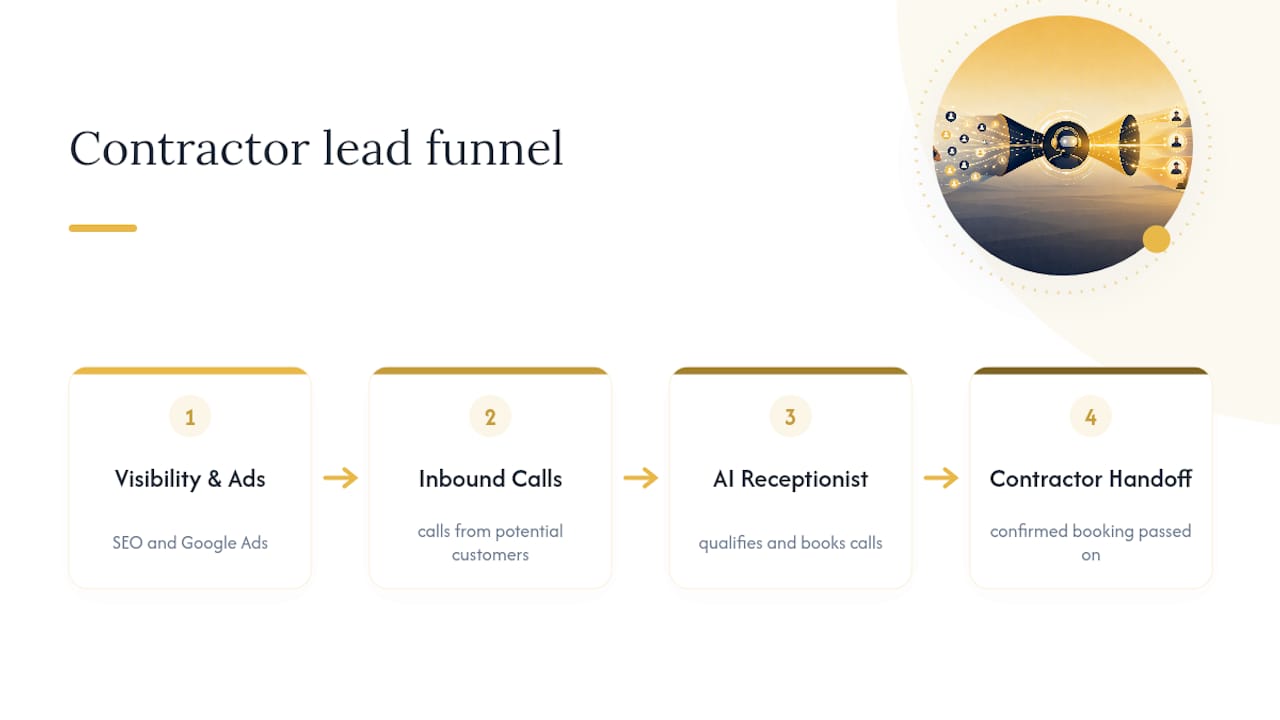
An AI receptionist doesn’t create demand. It protects the demand your marketing already generates. If your local SEO and Google Ads are driving calls but your office can’t field half of them, the AI receptionist is what stops that ad spend from leaking out the bottom of the funnel. That’s the order that matters: fix visibility and conversion first, then add automation to guard what you’ve built.
We’ve seen this pattern across the contractor accounts we manage: the businesses that get the most value from call automation are the ones who already have booking rules and calendar integrations locked down before they scale their ad budget. Get those rules right, then grow the spend behind them.
— OnLead
How OnLead helps contractors pilot AI call handling without the guesswork
Onlead is the practical alternative to hiring a full-time receptionist or hoping your voicemail catches every lead. We run a free audit first, checking your current call volume, missed-call rate, and whether an AI pilot would actually pay for itself before you spend a dollar on the tool itself. From there, we help connect the receptionist to your calendar or field service platform so bookings land automatically instead of sitting in an inbox, and we pair it with local SEO so the calls keep coming in the first place. Most campaigns launch shortly after that first audit, working closely with a dedicated expert rather than passed between account managers. If you’re ready to see what your call volume could support, start with a free lead-generation audit and find out where the leaks are.
Where these numbers and rules come from
- ProTradeHQ’s contractor AI receptionist guide: call-flow structure and escalation warnings
- WowServe’s buyer’s guide: integration depth and live-booking criteria
- OnCrew’s 2026 buyer guide: pilot KPIs and hybrid staffing models
- Enterprise DNA’s research on AI adoption in trades: common failure modes and cost recovery versus a full-time hire
- 121 Group’s AI automation services: background on customer-facing AI agent capability
Sources
- AI Receptionist for Contractors: When It Makes Sense and When It Doesn’t | ProTradeHQ
- AI Receptionists for Contractors: A Buyer’s Guide | WowServe
- Virtual Receptionist for Contractors vs AI Phone Agent: 2026 Buyer Guide | OnCrew